

✨ 3DGS Support#
🔒 This feature requires a commercial or academic license. Contact Motphys
MotrixSim Pro can load 3D Gaussian Splatting point-cloud assets in MJCF scenes and bind point-cloud instances to the world or a specific body in the renderer. This is useful for bringing scanned real-world environments, object appearances, or background scenes in as a high-fidelity visual layer, used alongside MotrixSim’s rigid bodies, joints, collision shapes, and sensors.
3DGS point clouds and traditional meshes are rendered together in the same frame, forming a hybrid rendering pipeline: the scanned real environment provides a photorealistic background and appearance as 3DGS, while objects that must participate in physics simulation (robots, manipulated objects, etc.) are still represented by mesh geom, kept consistent with the real environment’s lighting through IBL. This pipeline has direct value for robotics tasks:
Narrowing the sim-to-real gap: camera sensors see imagery close to real footage rather than a hand-built synthetic scene, which helps train and validate vision policies, VLA, and other models that depend on image input.
Building diverse scenes at low cost: scanning a real scene is enough to obtain a usable simulation background, removing the need for per-object modeling and material tuning, and making it easy to batch-generate training environments for navigation and manipulation.
Decoupling physics from visuals: high-fidelity appearance is handled by 3DGS while collision and dynamics still use simplified geometry, preserving rendering realism without sacrificing simulation performance or controllability.
Demo Video#
G1 combined with a 3DGS scene in hybrid rendering
Supported Capabilities#
Declare reusable 3DGS point-cloud assets in
<asset>.Create 3DGS instances under
<worldbody>or any<body>.Support
.plyand.gcloudpoint-cloud files.Support position, rotation, scale, opacity, splat-size multiplier, and visibility group.
When a 3DGS instance is attached under a moving body, its render pose updates together with that body.
Support displaying 3DGS content through camera rendering and the regular
RenderAppsynchronization flow.
3DGS only provides a visual representation; it does not automatically generate collision shapes or inertia. Objects that must participate in physics simulation should still use regular geom, body/inertial, and the related collision configuration.
MJCF Usage#
First define a gsplat asset in <asset>, then reference it via asset under <worldbody> or a <body>:
<mujoco model="gsplat_scene">
    <asset>
        <gsplat name="office_scan" file="assets/office_scan.ply"/>
    </asset>

    <worldbody>
        <gsplat
            name="static_office"
            asset="office_scan"
            pos="0 0 0"
            quat="1 0 0 0"
            scale="1 1 1"
            opacity="1"
            splatscale="1"
            group="0"/>

        <body name="tracked_object" pos="0 0 0.5">
            <freejoint/>
            <geom type="box" size="0.2 0.2 0.2" mass="1"/>
            <gsplat name="object_visual" asset="office_scan" scale="0.2 0.2 0.2"/>
        </body>
    </worldbody>
</mujoco>
asset/gsplat defines the point-cloud file:
Attribute |
Description |
|---|---|
|
Asset name of the point cloud, referenced by |
|
Path to a |
|
Optional media-type override |
body/gsplat creates an instance:
Attribute |
Description |
|---|---|
|
Optional instance name |
|
Name of the referenced |
|
Instance position in the local frame, default |
|
Instance rotation in the local frame |
|
Per-axis scale, default |
|
Global opacity multiplier, default |
|
Gaussian covariance scale multiplier, default |
|
Visibility group, default |
IBL Baking#
To let rigid bodies placed inside a 3DGS point cloud (robots, objects, etc.) blend into the scanned scene’s real lighting, MotrixSim provides the mx-ibl-bake command: it captures environment maps from a 3DGS .ply or .gcloud point cloud and bakes them into the KTX2 textures required for Image-Based Lighting (IBL). The baked diffuse / specular maps are then referenced as environment maps in MJCF, providing PBR materials with ambient light and reflections consistent with the point cloud.
The image below compares the rendered result of the same scene with environment lighting off versus on: with it off (top), only the built-in headlight remains, so the robot is dark and visually disconnected from the background point cloud’s lighting; with it on (bottom), the robot receives the point-cloud environment’s diffuse and specular contributions, and its metallic materials show reflections and brightness consistent with the room.
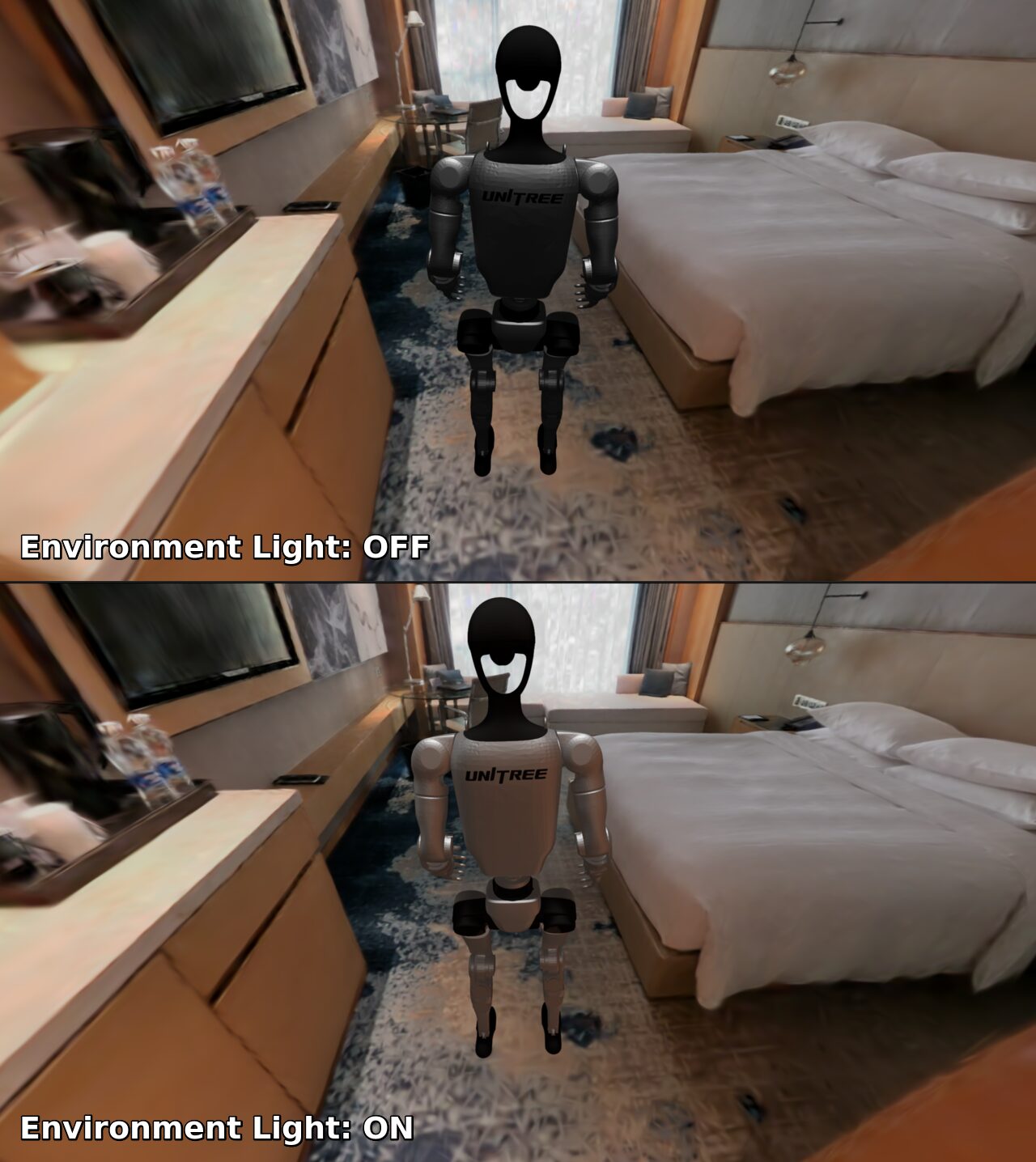
Render comparison with IBL environment lighting off (top) and on (bottom)#
Using this tool requires installing the gs-ibl extra:
uv add "motrixsim[gs-ibl]"
Baking Command#
Basic usage:
uv run mx-ibl-bake \
    --ply assets/office_scan.ply \
    --out assets/office_ibl \
    --auto-center bounds \
    --resolution 1024
Common options:
Option |
Description |
|---|---|
|
Path to the input |
|
Output directory |
|
Manually specify the probe position |
|
Use the point-cloud mean as the probe position |
|
Use the point-cloud bounding-box center as the probe position |
|
Capture resolution |
|
Near/far clipping planes of the capture camera |
|
Keep the six cube faces and |
By default, baking keeps only two KTX2 files:
assets/office_ibl/
├── diffuse.ktx2    # diffuse irradiance environment map
└── specular.ktx2   # prefiltered specular environment map
Use --debug to keep the six cube faces under capture/ and the composited environment.png when you need to inspect capture quality.
Using the Baked Result in MJCF#
The baked diffuse.ktx2 and specular.ktx2 are referenced in MJCF via texture elements under <asset>, using type="envdiff" (diffuse environment map) and type="envspec" (specular environment map) respectively. File paths are relative to the compiler texturedir:
<mujoco model="gsplat_scene_ibl">
    <!-- Layer IBL on top of an existing 3DGS scene; include lets you reuse it -->
    <include file="scene.xml"/>

    <compiler texturedir="."/>

    <asset>
        <texture name="env_diff" type="envdiff" file="office_ibl/diffuse.ktx2"/>
        <texture name="env_spec" type="envspec" file="office_ibl/specular.ktx2"/>
    </asset>

    <visual>
        <!-- With IBL present, usually dim the built-in headlight to avoid double lighting -->
        <headlight diffuse="0.2 0.2 0.2" ambient="0.05 0.05 0.05" specular="0 0 0"/>
        <!-- Controls the overall lighting intensity of the environment map -->
        <map envmapintensity="1000"/>
        <!-- HDR environment maps are best paired with tonemapping -->
        <tonemapping method="aces"/>
    </visual>
</mujoco>
Key points:
As long as the
envdiff/envspectextures are declared in<asset>, the renderer automatically uses them as the scene’s IBL ambient light, with no manual binding ongeomrequired; diffuse and specular should be provided as a pair.The environment map only affects the lighting of regular
geomusing PBR materials. It does not change the appearance of the 3DGS point cloud itself (the cloud already carries its own baked colors). Its purpose is to keep rigid bodies added to the scene lit consistently with the point cloud.envmapintensitycontrols the overall intensity of the environment map and should match the exposure used at bake time; if the result is too dark or too bright, adjust this value first before re-baking.KTX2 maps are HDR; pair them with
<tonemapping>to map the high dynamic range into the display range. Optionally layer screen-space global illumination such as<ssgi>for added realism.
For a complete example, see examples/pro/assets/nav_scene_1/scene_ibl.xml in the repository, which layers IBL and SSGI configuration on top of a 3DGS navigation scene.