

🔨 Programmatic Model Building#
motphys-scene-descriptor (MSD) provides scene description and composition capabilities in MotrixSim. In Python, it is exposed through motrixsim.msd.
If we split the simulation workflow into two stages:
Scene description and assembly (mutable)
Physics simulation runtime (high-performance, stable)
Then MSD is the core tool for stage 1. It organizes, transforms, and combines MJCF, URDF, and USD assets, then builds them into a simulatable SceneModel.
What Problems It Solves#
In robotics and multibody workflows, common needs include:
Mounting different end-effectors on the same robot
Instancing the same model multiple times in one scene
Extracting a subtree from a large model and attaching it elsewhere
Applying translation/rotation and naming conventions before simulation
Editing raw model files repeatedly is costly and error-prone. The key value of MSD is to unify assets from different formats into one World space, then apply one programmatic pipeline:
Load MJCF, URDF, or USD through
msd.from_fileLoad generated MJCF/URDF strings through
msd.from_strUse the same
attach/transform/prefix/buildflow after unification
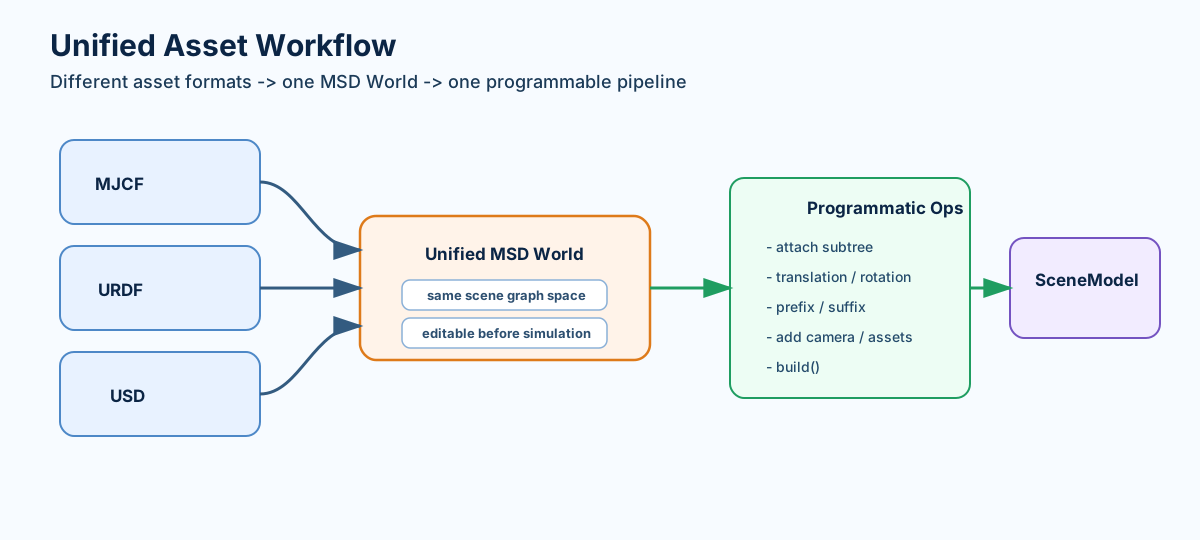
MSD unifies MJCF/URDF/USD assets into one programmable space.#
5-Minute Quick Start#
Step 1: Load scene and model#
import motrixsim as mx

scene = mx.msd.from_file("examples/assets/store/scene.xml")
robot = mx.msd.from_file("examples/assets/boston_dynamics_spot/spot.xml")
Step 2: Attach model into scene#
scene.attach(
    robot,
    other_translation=[1.0, 0.0, 0.0],
    other_prefix="spot_",
)
Step 3: Build into a simulatable SceneModel#
model = scene.build()
data = mx.SceneData(model)
mx.step(model, data)
This is the most common MSD workflow: load -> compose -> build -> simulate.
Full Example Code#
import motrixsim as mx

robot = mx.msd.from_file("robot.xml")
full_arm = mx.msd.from_file("arm_with_base.xml")

# Only attach the "forearm" subtree, not the entire arm model
robot.attach(
    full_arm,
    self_link_name="shoulder",
    other_link_name="forearm",  # Extract from this link
    other_prefix="arm_"
)

model = robot.build()
Complete Example#
Here’s a complete example that creates a scene with multiple robots. For the full example, see examples/physics/combine_msd.py.
import time

import motrixsim as mx

# Load the base scene
msd_scene = mx.msd.from_file("examples/assets/store/scene.xml")

# Load a dog model and attach an arm to it
msd_dog = mx.msd.from_file("examples/assets/boston_dynamics_spot/spot.xml")
msd_arm = mx.msd.from_file("examples/assets/stanford_tidybot_adhesion/tidybot.xml")
# Attach arm subtree to the dog's hip link
msd_dog.attach(
    msd_arm,
    self_link_name="hl_hip",
    other_link_name="bracelet_link",  # Extract subtree from arm
    other_rotation=[-0.71, 0, 0, 0.71],  # Rotate 90 degrees around X axis
    other_prefix="arm_",
)

# Attach multiple dogs to the scene at different positions
# Note: other is cloned internally, so msd_dog can be reused
msd_scene.attach(msd_dog, other_translation=[1, 0, 0], other_prefix="dog0_")
msd_scene.attach(msd_dog, other_translation=[2, 0, 0], other_prefix="dog1_")
msd_scene.attach(msd_dog, other_translation=[3, 0, 0], other_prefix="dog2_")

# Build the final model
model = msd_scene.build()

with mx.render.RenderApp("warn") as render:
    render.launch(model)
    data = mx.SceneData(model)

    while True:
        time.sleep(model.options.timestep)
        mx.step(model, data)
        render.sync(data)
Core Concepts#
Concept |
Description |
|---|---|
|
Mutable scene object in |
|
Merge another |
|
Compile |
|
Base directory for resolving relative texture/mesh asset paths. |
API Quick Reference#
API |
Usage |
|---|---|
Load |
|
Load from model string (dynamic generation) |
|
Compose models with transforms, prefixes/suffixes, subtree extraction |
|
Build final |
Full API details: motrixsim.msd.
FAQ#
Q: I already have MJCF/URDF. Do I still need to write MSD manually?
A: Usually no. You can directly usemsd.from_file(...).build(). Deep MSD editing is only needed for programmatic composition/editing cases.Q: Can I reuse the same attached model multiple times?
A: Yes.attachclonesotherinternally, which is suitable for batch instancing.Q: How do I use USD scenes?
A: Usemotrixsim.load_model(...)to load directly asSceneModel, ormotrixsim.msd.from_file(...)when you need to compose the USD asset with otherMSDworlds first. Both require theusdextra.