

🤖 Rigid Body (Body)#
In the world of MotrixSim, a Body can be a single rigid body or an articulated body composed of joints and links. Visually, it can be represented as follows:
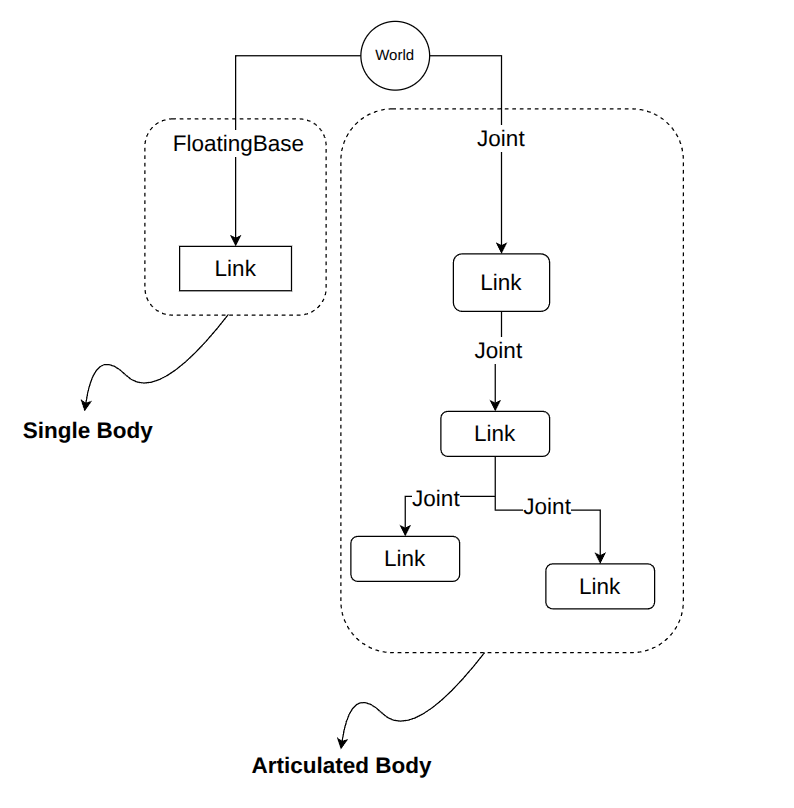
Note that the connection between a Body and the World can be floating (floating base), fixed, or connected via a joint.
MJCF Mapping#
When you use MJCF for scene description, MotrixSim treats each top-level <body> element under <worldbody> and its entire subtree as a Body, forming a kinematic tree structure.
Consider the following example:
<mujoco>
  <include file="./common/materials.xml"/>
  <option timestep="0.01"/>
  <worldbody>
    <light name="light" pos="0 0 3" directional = "true"/>
    <camera name="fixed" pos="0 -3 3" xyaxes="1 0 0 0 1 1"/>
    <geom name="floor" type="plane" size="5 5 0.1" pos="0 0 0" rgba="0.8 0.9 0.8 1" material="motphys-ground"/>

    <body name="free_cube" pos="0 0 1.5">
        <freejoint/>
        <geom name="cube" type="box" size="0.25 0.25 0.25" pos="0 0 0" rgba="1 0 0 1"/>
    </body>

    <body name="sphere" pos="2 0 1.5">
        <geom name="shpere" type="sphere" size="0.25" pos="0 0 0" rgba="0 1 0 1"/>
    </body>

    <body name="capsule" pos="0 2 3">
        <joint type="hinge" axis="0 1 0"/>
        <geom  type="sphere" size="0.25" rgba="0 0 1 1"/>
        <body pos="0.75 0 0" euler="0 90 0">
            <joint type="hinge" axis="1 0 0" />
            <geom  type="capsule" size="0.25 0.25"  rgba="1 1 0 1"/>
        </body>
    </body>

  </worldbody>
</mujoco>
In this MJCF file, there are three <body> elements at the top level under <worldbody>, so MotrixSim parses them as three Bodies.
# Create render window for visualization
with RenderApp() as render:
    # The scene description file
    path = "examples/assets/body.xml"
    # Load the scene model
    model = load_model(path)
    # Create the render instance of the model
    render.launch(model)
    # Create the physics data of the model
    data = SceneData(model)
    # How many bodies in the model?
    num_bodies = model.num_bodies
    # we have 3 bodies in the model
    assert num_bodies == 3, f"Expect 3 bodies, but got {num_bodies}"
Note the third body named “capsule”. It has a child body and is connected via a hinge joint. Therefore, in MotrixSim, this body is parsed as an articulated body, which contains two links and one joint.
capsule = model.get_body("capsule")
assert capsule is not None, "Expect capsule to be a body in model"
assert capsule.num_links == 2, "Expect capsule to have two links"
assert capsule.num_joints == 2, "Expect capsule to have two joints"
Note
Do not confuse the <body> tag in MJCF with the Body object in MotrixSim.
The <body> tag in MJCF is mapped to a Link object in MotrixSim. For more information about links, see Link.
freejoint#
If a <body> element in MJCF contains a <freejoint> element, the corresponding Body object will have the floatingbase property:
# we can get floatingbase if the body is free move
cube_fb = cube.floatingbase
assert cube_fb is not None, "Expect cube to be a floating base body"
With the floatingbase object, you can perform additional operations that are only available to free-moving bodies. For more details, see FloatingBase.
API Reference#
For more APIs related to Body, see Body API