

🔨 程序化模型构建#
motphys-scene-descriptor(下文简称 MSD)是 MotrixSim 的场景描述与组合能力。在 Python 侧,它通过 motrixsim.msd 暴露给用户。
如果把仿真流程拆成两个阶段:
场景描述与组装阶段(可变)
物理仿真运行阶段(高性能、稳定)
那么 MSD 就是第 1 阶段的核心工具,负责把 MJCF/URDF/MSD 文件组织、变换、组合后,构建成可仿真的 SceneModel。
它解决了什么问题#
在机器人或多体系统开发中,常见需求是:
同一机器人挂载不同末端执行器
同一个模型在场景里实例化多份
从大模型中提取子树拼接到另一个模型
在仿真前统一做平移、旋转和命名空间管理
如果直接在原始模型文件里反复手改,维护成本高且容易出错。MSD 的关键价值是把不同来源的资产先统一到同一个 World 空间,再做程序化操作:
MJCF/URDF 可通过
msd.from_file或msd.from_str读入WorldUSD 可通过
load_usd2msd先转换为World(依赖usd2msd)统一后就能用同一套
attach/transform/prefix/build流程完成组装与编译
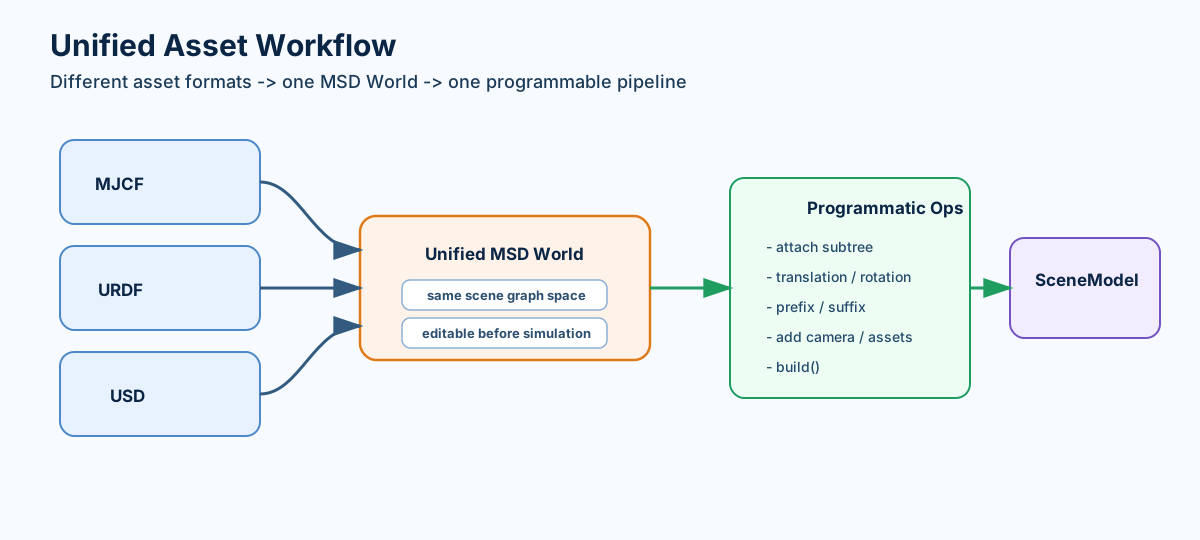
MSD 将 MJCF/URDF/USD 等不同资产格式统一到同一可编排空间。#
5 分钟快速上手#
第一步:加载场景与模型#
import motrixsim as mx

scene = mx.msd.from_file("examples/assets/store/scene.xml")
robot = mx.msd.from_file("examples/assets/boston_dynamics_spot/spot.xml")
第二步:把模型附加到场景#
scene.attach(
    robot,
    other_translation=[1.0, 0.0, 0.0],
    other_prefix="spot_",
)
第三步:构建为可仿真的 SceneModel#
model = scene.build()
data = mx.SceneData(model)
mx.step(model, data)
上面这三步就是最常见的 MSD 工作流:加载 -> 组合 -> build -> 仿真。
完整示例代码#
import motrixsim as mx

robot = mx.msd.from_file("robot.xml")
full_arm = mx.msd.from_file("arm_with_base.xml")

# 只附加 "forearm" 子树,而不是整个手臂模型
robot.attach(
    full_arm,
    self_link_name="shoulder",
    other_link_name="forearm",  # 从此连杆提取
    other_prefix="arm_"
)

model = robot.build()
完整示例#
以下是一个创建包含多个机器人场景的完整示例。完整代码请参阅 examples/physics/combine_msd.py。
import time

import motrixsim as mx

# Load the base scene
msd_scene = mx.msd.from_file("examples/assets/store/scene.xml")

# Load a dog model and attach an arm to it
msd_dog = mx.msd.from_file("examples/assets/boston_dynamics_spot/spot.xml")
msd_arm = mx.msd.from_file("examples/assets/stanford_tidybot_adhesion/tidybot.xml")
# Attach arm subtree to the dog's hip link
msd_dog.attach(
    msd_arm,
    self_link_name="hl_hip",
    other_link_name="bracelet_link",  # Extract subtree from arm
    other_rotation=[-0.71, 0, 0, 0.71],  # Rotate 90 degrees around X axis
    other_prefix="arm_",
)

# Attach multiple dogs to the scene at different positions
# Note: other is cloned internally, so msd_dog can be reused
msd_scene.attach(msd_dog, other_translation=[1, 0, 0], other_prefix="dog0_")
msd_scene.attach(msd_dog, other_translation=[2, 0, 0], other_prefix="dog1_")
msd_scene.attach(msd_dog, other_translation=[3, 0, 0], other_prefix="dog2_")

# Build the final model
model = msd_scene.build()

with mx.render.RenderApp("warn") as render:
    render.launch(model)
    data = mx.SceneData(model)

    while True:
        time.sleep(model.options.timestep)
        mx.step(model, data)
        render.sync(data)
核心概念#
概念 |
说明 |
|---|---|
|
|
|
把另一个 |
|
把 |
|
解析纹理、网格等相对路径的基准目录,文件引用场景必须明确。 |
常用接口速览#
接口 |
用途 |
|---|---|
从 MJCF/URDF/MSD 文件加载 |
|
从字符串加载,适合动态生成模型 |
|
|
将 USD 转换为 |
组合模型,支持平移旋转、前后缀、子树提取 |
|
构建最终 |
完整 API 参见:motrixsim.msd。
FAQ#
Q:我已经有 MJCF/URDF,还需要手写 MSD 吗?
A:通常不需要。可以直接msd.from_file(...).build(),只有在“程序化组合/编辑”场景下才需要深入使用 MSD 对象。Q:我可以复用同一个被附加模型多次吗?
A:可以。attach时会内部克隆other,适合批量实例化同一个子模型。Q:USD 场景如何接入?
A:可使用motrixsim提供的 USD 加载流程先转换到MSD再构建SceneModel(需要安装usd2msd相关依赖)。