

🤖 刚体(Body)#
在 MotrixSim 的世界中,Body 可以是单个刚体 (Single Body),也可以是一个由关节 (Joint) 和连杆 (Link) 构成的多体系统 (Articulated Body)。如果用一幅图来表示,就是
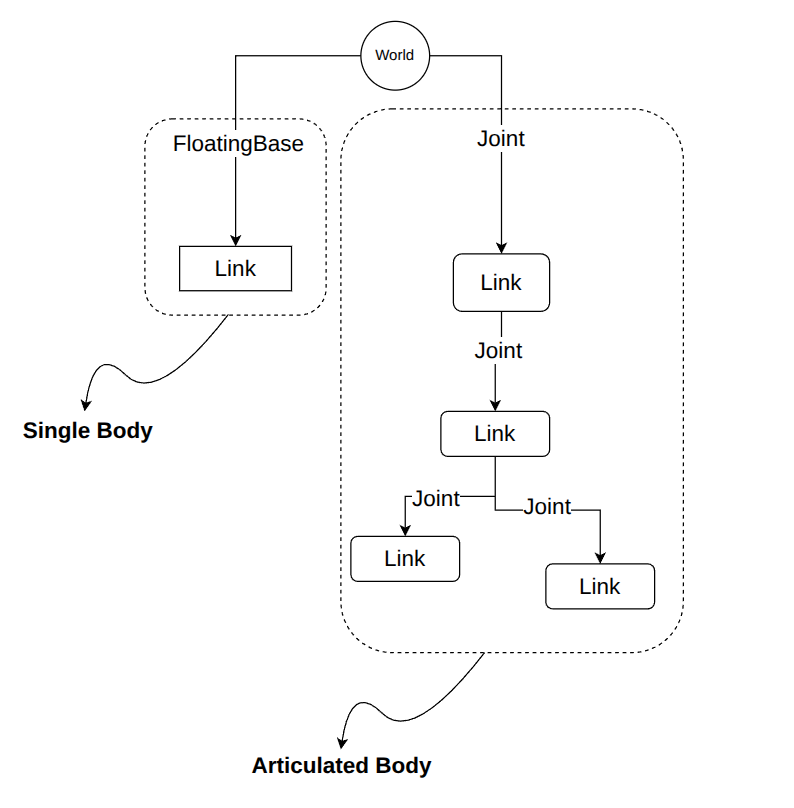
注意到, Body 与 World 的连接关系,既可以是自由移动的(floatingbase),也可以是固定的(fixed),或者通过 joint 进行连接。
MJCF 映射#
当您使用 MJCF 来做场景描述时,MotrixSim 会将 <worldbody> 下的一级 <body> 元素以及它的所有子元素所构成的 kinematics 树结构,视作一个 Body 来处理。
参考下面的例子:
<mujoco>
  <include file="./common/materials.xml"/>
  <option timestep="0.01"/>
  <worldbody>
    <light name="light" pos="0 0 3" directional = "true"/>
    <camera name="fixed" pos="0 -3 3" xyaxes="1 0 0 0 1 1"/>
    <geom name="floor" type="plane" size="5 5 0.1" pos="0 0 0" rgba="0.8 0.9 0.8 1" material="motphys-ground"/>

    <body name="free_cube" pos="0 0 1.5">
        <freejoint/>
        <geom name="cube" type="box" size="0.25 0.25 0.25" pos="0 0 0" rgba="1 0 0 1"/>
    </body>

    <body name="sphere" pos="2 0 1.5">
        <geom name="shpere" type="sphere" size="0.25" pos="0 0 0" rgba="0 1 0 1"/>
    </body>

    <body name="capsule" pos="0 2 3">
        <joint type="hinge" axis="0 1 0"/>
        <geom  type="sphere" size="0.25" rgba="0 0 1 1"/>
        <body pos="0.75 0 0" euler="0 90 0">
            <joint type="hinge" axis="1 0 0" />
            <geom  type="capsule" size="0.25 0.25"  rgba="1 1 0 1"/>
        </body>
    </body>

  </worldbody>
</mujoco>
这个 mjcf 文件中,<worldbody> 的一级目录下有三个 <body> 元素,因而在 motrxisim 中会被解析为三个 Body 。
# Create render window for visualization
with RenderApp() as render:
    # The scene description file
    path = "examples/assets/body.xml"
    # Load the scene model
    model = load_model(path)
    # Create the render instance of the model
    render.launch(model)
    # Create the physics data of the model
    data = SceneData(model)
    # How many bodies in the model?
    num_bodies = model.num_bodies
    # we have 3 bodies in the model
    assert num_bodies == 3, f"Expect 3 bodies, but got {num_bodies}"
注意第三个 name 为 capsule 的 body,它拥有一个 child body, 并且通过 hinge joint 连接。因此在 MotrixSim 中,这个 body 会被解析为一个多体系统(Articulated Body),它包含了两个 link 和一个 joint。
capsule = model.get_body("capsule")
assert capsule is not None, "Expect capsule to be a body in model"
assert capsule.num_links == 2, "Expect capsule to have two links"
assert capsule.num_joints == 2, "Expect capsule to have two joints"
备注
不要混淆 mjcf 中的<body>标签和 MotrixSim 中的Body对象。
mjcf 中的<body>标签,会被映射为 MotrixSim 中的Link对象, 关于 link 的更多信息,请参考 Link
freejoint#
如果 mjcf 中的<body> 元素下有 <freejoint> 元素,则 Body 对象会拥有 floatingbase 属性:
# we can get floatingbase if the body is free move
cube_fb = cube.floatingbase
assert cube_fb is not None, "Expect cube to be a floating base body"
通过 floatingbase 对象,您可以执行更多只有 free move body 才能执行的操作,更多细节请参考 FloatingBase
API Reference#
更多与 Body 相关的 API,请参考 Body API